

7 Best STEM Toys: Building, Coding, Science and More

The best STEM toy is the one someone wants to use again after the first afternoon. A builder, a puzzle fan and a child who wants to make things fizz can all enjoy STEM, but they need different gifts. These seven picks compare the activity you are buying, the setup it needs and the main reason to choose something else.
STEMGeek may earn a commission if you buy through some links on this page.
For open-ended building, start with LEGO’s Large Creative Brick Box. For a screen-free introduction to coding, consider Botley 2.0. Snap Circuits is our electronics choice, while Piper is the larger computer-building project. The table helps narrow that choice before you get into the details.
Compare seven STEM gifts
| Pick | Best fit | Plan for |
|---|---|---|
| LEGO Large Creative Brick Box | Open-ended construction; ages 4+ | A place to build and keep small pieces |
| Botley 2.0 Coding Robot Activity Set | Screen-free coding; ages 5+ | Clear floor space; five AAA batteries, not included |
| Osmo Genius Starter Kit + Family Game Night | Math, shapes and mixed learning; ages 5–10 on current listing | Compatible iPad running iPadOS 15 or later |
| ThinkFun Gravity Maze | Spatial logic; ages 8+ | Single-player puzzle; a level play surface |
| Snap Circuits Classic | Practical electronics; ages 8+ | Four AA alkaline batteries, not included |
| Piper Computer Kit V4B with Sensor Explorer | Building a computer and exploring coding | More assembly and setup; maker age not verified |
| GeoSafari Jr. My First Science Kit | First experiments; ages 6+ | Read the activity instructions and plan adult help |
Our STEM toy picks
1. LEGO Large Creative Brick Box
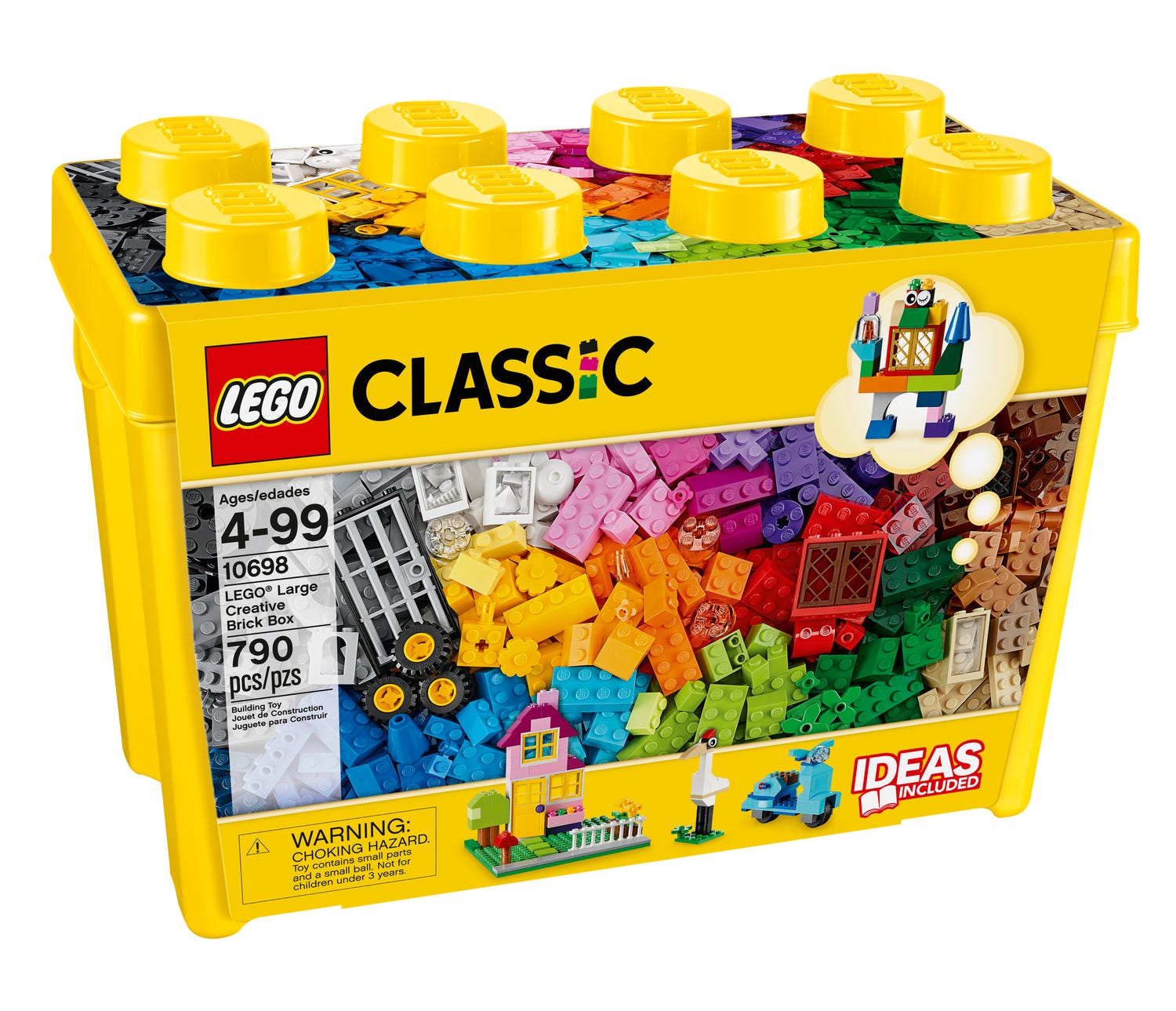
A box of ordinary bricks can be a better gift than an elaborate model when the recipient likes making up their own designs. LEGO Classic Large Creative Brick Box 10698 has 790 pieces, including windows, doors, wheels and two baseplates. LEGO rates it 4+, so it covers a broad stretch of childhood without requiring a screen or a particular story to follow.
Our reason for choosing it is repeat use. A house can become a garage; a vehicle can be rebuilt with a different wheel layout. Try setting a small challenge, such as making a bridge wide enough for a toy car, then let the builder decide how to solve it. The point is experimenting with a design, not completing a lesson.
The drawback is the lack of one obvious finish line. A child who wants to recreate the pictured spaceship may prefer a themed set. Plan storage for the small pieces and follow the package warnings, especially around younger siblings.
See the manufacturer’s product information
2. Botley 2.0 Coding Robot Activity Set

Botley 2.0 Activity Set LER2938 is our choice for introducing coding without handing over a tablet. Learning Resources rates it 5+ and describes screen-free programming with obstacle and loop modes. The attraction is straightforward: plan a sequence, send it to the robot, and see whether the movement matches your intention.
We would choose it for a child who enjoys setting up little challenges on the floor. Start with a short route before adding turns or obstacles. If Botley ends up in the wrong place, work backward through the instructions together. That gives trial and error a visible result, without requiring the child to read a programming language.
Its limits are part of the appeal: this is an introduction to sequences and repeated actions, not a general-purpose computer. Choose Piper below for a more involved computer-building project. Confirm the LER2938 Activity Set bundle when buying; Botley listings can refer to different packages. Add five AAA batteries (not included): three for Botley and two for the remote. An adult should install them using a Phillips screwdriver.
See the manufacturer’s product information · Check on Amazon
3. Osmo Genius Starter Kit + Family Game Night
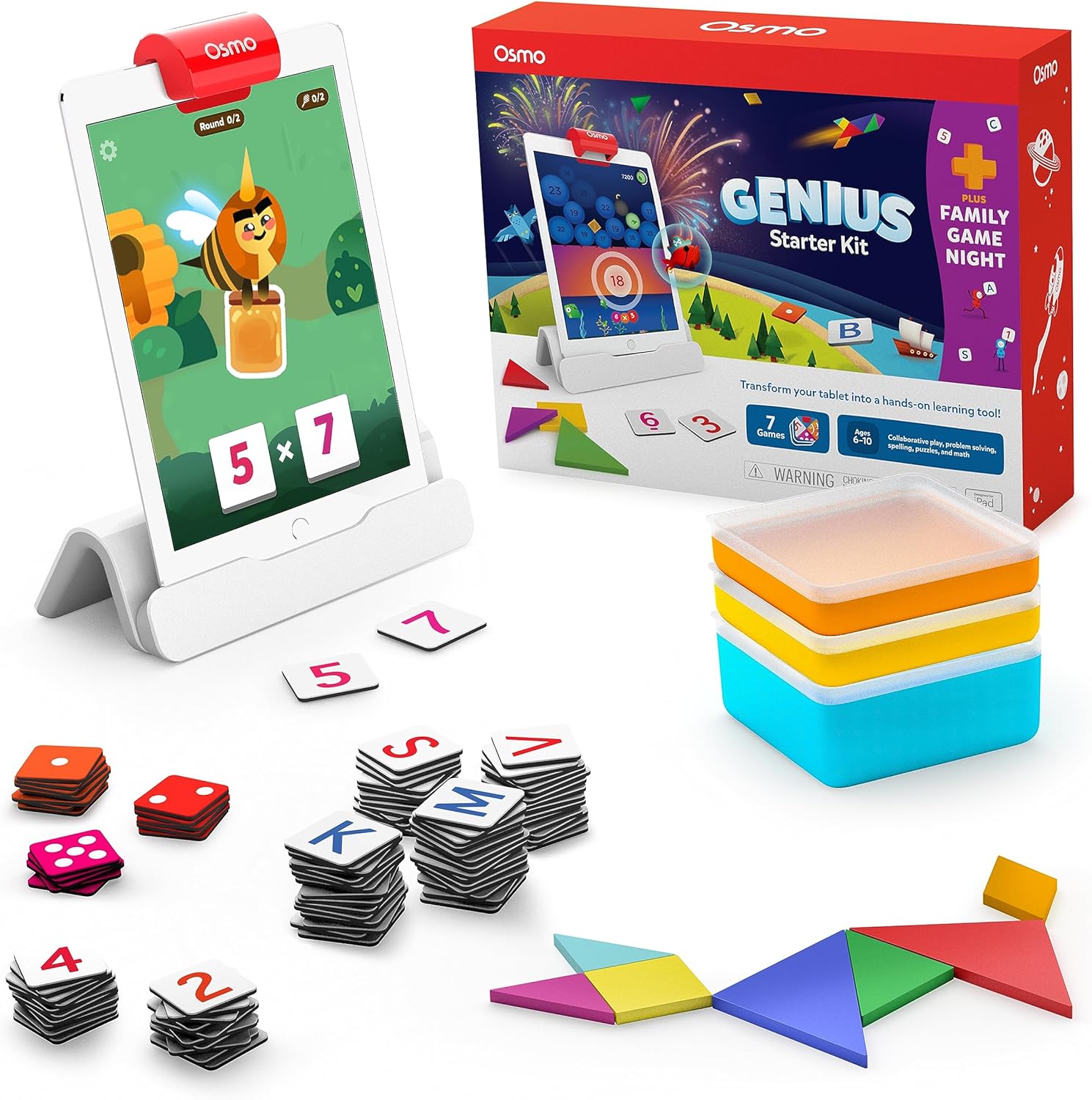
Osmo suits a child who likes tablet games but also enjoys handling shapes, letters and number tiles. The current Genius Starter Kit + Family Game Night combines physical pieces with activities on a compatible iPad. Osmo’s current listing gives ages 5–10, while its box photo shows 6–10. Follow the age guidance on the kit you receive. A compatible iPad running iPadOS 15 or later is required; check the exact model before ordering.
Unlike a construction box, Osmo provides a defined activity to begin with. We would pick it for families who want a mix of math, spelling, drawing and puzzle play, rather than a single science subject. It still uses a screen, so Botley or LEGO is the better match if a screen-free gift is the priority.
Our earlier hands-on Osmo Genius review records children aged six to eight enjoying the games. That experience concerns the earlier kit, not a new test of this bundle. Use the current store for compatibility and contents; older iPad and Fire-tablet packages are not interchangeable.
See the manufacturer’s product information
4. ThinkFun Gravity Maze

ThinkFun Gravity Maze 44001006 combines a marble-run format with 60 single-player challenges. The manufacturer rates this version 8+. Instead of starting with a completely blank canvas, the player has a problem to solve: arrange the pieces so the ball can complete its route.
We would choose it for someone who enjoys puzzles with an answer to work toward. The satisfying part is comparing the route you imagined with what actually happens, then changing the arrangement. An adult can join the discussion without taking over: ask what the next piece needs to do, or which part of the route seems wrong.
This is less open-ended than a big construction set and is not a multiplayer board game. That makes it a good individual activity, but a poor match for a family expecting separate turns and player roles. Look for model 44001006; the younger Gravity Maze Builder is a different product with a different challenge set.
See the manufacturer’s product information · Check on Amazon
5. Snap Circuits Classic

Snap Circuits Classic SC300 is our electronics pick for a child who likes following a diagram and making something happen. Its components snap together on a base grid, avoiding soldering while providing a structured introduction to circuits. Elenco rates the Classic kit 8+ and identifies it as the 300-project version.
The appeal is the connection between the plan and the result. If a circuit does not work, compare it with the diagram rather than immediately rebuilding everything. We would choose SC300 ahead of a coding robot when the recipient is more interested in electrical components than writing instructions for a machine. It also offers a useful shared project for an adult and child.
Add four AA alkaline batteries. Elenco advises adult discretion and supervision: use the supplied battery holder, never connect circuits to household outlets or other power sources, and never leave a circuit unattended with batteries installed. Read the manual before experimenting beyond the included projects.
See the manufacturer’s product information · Check on Amazon
6. Piper Computer Kit V4B with Sensor Explorer

Piper Computer Kit V4B with Sensor Explorer is the substantial project in this shortlist: build a Raspberry Pi-based computer, then use it to explore coding and electronics. The current maker listing includes a case, seven-inch display, speaker, mouse, sensors and build tools. Its URL still says V4A, so check the displayed V4B configuration rather than buying by an old article link.
We like the original idea behind this recommendation: assembling a computer makes its parts less mysterious. Choose it for a recipient who wants to understand the machine as well as use the software. It is a better fit for a shared, ongoing project than a gift expected to work immediately after unwrapping.
A manufacturer consumer age rating was not verified; lesson grade ranges are not a substitute. Check the current contents and whether you need a keyboard or other extras. This is not an official Minecraft product, and specifications from earlier Piper kits should not be assumed to apply to V4B.
See the manufacturer’s product information
7. GeoSafari Jr. My First Science Kit

For a child more interested in “what happens if…?” than in assembling a robot, GeoSafari Jr. My First Science Kit 5087 provides a different starting point. Educational Insights rates it 6+ and lists 15 experiments, including eruptions, crystals and static electricity. That spread lets a young scientist sample several kinds of investigation.
We would make this a shared gift: choose an activity together, ask for a prediction, then compare it with the result. A notebook for drawings can make the next session more interesting without turning the kit into a school assignment. The appeal is observing and asking questions, rather than collecting a finished model for the shelf.
Fifteen experiments are a defined set of activities, not a promise of endless replacement supplies. Read the instructions and materials list before the first session, follow all product warnings and plan help as needed. For a child who already has a clear interest in chemistry, a dedicated chemistry set may offer a more focused next step.
See the manufacturer’s product information · Check US stock at Staples
How to choose a STEM gift they will use
Choose the activity before the label. “STEM” stands for science, technology, engineering and mathematics, but the letters do not tell you what happens during play. Look for a clear action: build a structure, solve a puzzle, arrange a circuit, write a sequence or observe an experiment. Match that action to the recipient’s interests.
Check age, safety and adult involvement separately. A manufacturer’s age rating matters, but it does not promise independent use. Read the warnings and think about the recipient’s experience. None of this shortlist is an infant toy; use our babies and infants guide or guide for four-year-olds when shopping for younger children.
Inspect the practical details. Clear instructions, well-matched parts and available support matter more than a large project count. Check batteries, consumables, devices, software requirements and storage. For an app-based gift, confirm compatibility before wrapping it; a school Chromebook or older tablet may not run the required software.
Look beyond the first build. Some people love a sequence of puzzles; others want to take everything apart and invent their own model. Both can be worthwhile. Ask whether the next session will involve a new challenge, a different design or a repeat of the same activity. A smaller kit that gets used can be a better gift than a complex one that stays boxed.
For a narrower comparison, see our coding toys, computer-building kits, STEM subscriptions and science board games. Our homepage helps you browse by age and interest.
What happened to earlier recommendations?
This guide previously gave its top award to LEGO Mindstorms Robot Inventor 51515. LEGO has retired that set, so it is no longer our default gift recommendation. Older robot and computer kits can depend on software or bundles that have changed. Check support for the exact model before buying old stock.
We have kept the route to our earlier Osmo experience above. Our Sphero BOLT review also remains available for readers researching that model; it is not a new test or an assertion about today’s offer. For chemistry specifically, see our MEL Chemistry review alongside current product and subscription terms.
How we chose these toys
We compared named models using manufacturer pages, manuals and the product checks behind our recent specialist guides. The fit judgments here are editorial recommendations, not guaranteed learning outcomes. This update adds no new hands-on testing; older first-hand experience is identified where linked. Confirm the exact package, seller, delivery cost and availability before ordering.
Last update on 2026-10-22 / Affiliate links / Images from Amazon Product Advertising API