
3 Best STEM Toys for 12-Year-Olds: Electronics, Robot Building and Coding

Many 12-year-olds are ready for projects with real consequences: a circuit that stays dark until it’s wired correctly, or a robot that only turns when the code is right. This guide keeps to three picks that cover electronics, robot building and coding at a level a 12-year-old can grow into, rather than a long list of look-alikes.
We chose these from the makers’ own product pages and support information, not hands-on testing. Ages, features and requirements are the makers’; the notes on fit are our judgment. Prices and stock change, so check with the seller before you buy. STEMGeek may earn a commission if you buy through some links on this page.
The three picks at a glance
| Pick | What it is | Maker’s age | Coding | Device or power |
|---|---|---|---|---|
| Snap Circuits Pro SC-500 | Electronics kit | 8+ | None | Batteries; no screen |
| Makeblock mBot2 | Robot kit to build and code | Not quoted (maker’s pages disagree) | Blocks to Python | Device to run mBlock; built-in rechargeable battery |
| Sphero RVR+ | Ready-built programmable robot | Grades 6–12 | Drawing, blocks, JavaScript, Python | Phone, tablet or computer; rechargeable battery |
Our picks
1. Snap Circuits Pro SC-500
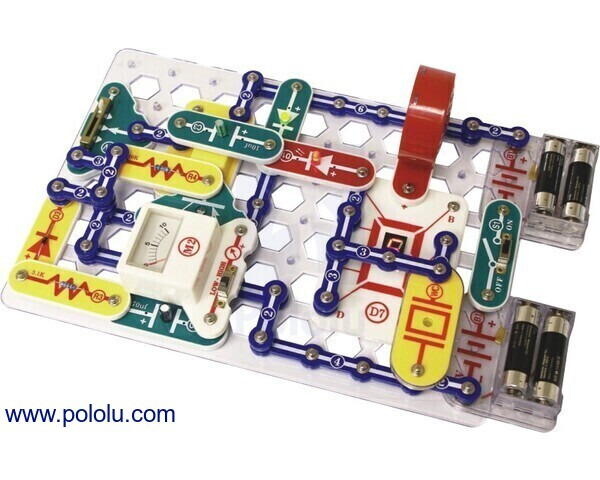
From the maker:
- Elenco model SC-500, part of the core Snap Circuits line; Elenco rates its standard Snap Circuits models ages 8+.
- Battery powered. Elenco says to use only the included battery holders or its specified AC-SNAP power supply.
- Replacement parts and manuals are available from Elenco.
Why it’s on the list: Snap Circuits parts snap together on a base grid, so a 12-year-old can build a working circuit, change one part and see what happens, without soldering or loose wires. It’s the only pick here that teaches electronics on its own terms rather than as a side effect of robotics, and it needs no screen at all. Because Elenco sells replacement parts and manuals, a lost piece doesn’t end the kit’s useful life.
Keep in mind: It may suit a 12-year-old who is new to electronics, with help as needed, while one who has already done a lot of Snap Circuits may find the format familiar. There’s no programming involved. Check Elenco’s listing for the parts list and project count, and follow its power-supply instructions rather than improvising with other batteries or adapters.
See Elenco · Check US stock at AC Supply
2. Makeblock mBot2

From the maker:
- Makeblock’s newer model in its mBot line; the original mBot is still sold separately.
- Coded in Makeblock’s mBlock software, from block coding through to Python.
- Can also be driven from a smartphone or gamepad, or run in automatic modes.
- Built-in rechargeable lithium battery; Makeblock quotes about five hours of play per charge.
Why it’s on the list: mBot2 covers the move from drag-and-drop blocks to typed Python inside the same software, which is the step many 12-year-olds are ready to take. Putting the robot together first also means they understand the hardware their code is controlling. The rechargeable battery avoids a steady supply of disposables.
Keep in mind: Makeblock’s own pages show different minimum ages for mBot2, so we haven’t quoted one; the Python path is why we think it suits this age. You’ll need a computer or tablet that runs mBlock, so check Makeblock’s supported platforms first. Makeblock’s US store says it ships only to the contiguous United States. Buy mBot2 by name: the older mBot is a simpler kit.
3. Sphero RVR+

From the maker:
- Sphero RVR+, SKU 940-0635, for grades 6–12.
- A programmable driving robot with onboard sensors, a rechargeable removable battery and expansion ports for add-on hardware.
- Coded through the Sphero Edu app or its browser version, using drawing, blocks, JavaScript or Python.
Why it’s on the list: It’s the only pick designed squarely for middle and high school, so a 12-year-old is at the start of its range rather than the end. Kids can begin by drawing a path or stacking blocks and move to JavaScript or Python without changing robots, and the expansion ports leave room for bigger hardware projects later.
Keep in mind: Sphero sells RVR+ largely to schools, and its product page can default to classroom packs, so select the single-robot option and confirm the price before ordering. It replaces the original Sphero RVR that earlier versions of this guide recommended; look for the RVR+ name and SKU 940-0635. Coding needs a phone, tablet or computer, so it isn’t a screen-free toy.
How to choose
- Curious how electronics work, no screen wanted: Snap Circuits Pro SC-500.
- Wants to build a robot and learn to code it: Makeblock mBot2, especially for a child ready to try Python.
- Wants a robot that works straight away and lasts into high school: Sphero RVR+.
- Check the device first. Both robots need a phone, tablet or computer for coding. Confirm your family’s device is supported before you buy.
- Treat ages as a guide. A maker’s age or grade band is a starting point, not a promise that every child will use a product without help.
We’ve kept this list short on purpose. Three picks that teach different things are more useful than a longer list of similar kits.
More STEM gift guides
- Robotics kits for middle school students
- Best coding toys for kids
- Best STEM toys for 8-year-olds, for a younger or newer builder
Last update on 2026-10-24 / Affiliate links / Images from Amazon Product Advertising API