
Best Coding Kits for 12-Year-Olds

Somewhere around 11 to 13, a lot of kids hit a wall with block coding. They’ve dragged enough blocks around in Scratch or at school to understand loops and conditions, and they’re ready to see what real code looks like. The kits below are picked for that step: each one either starts in blocks and moves to Python or JavaScript, or builds the problem-solving that text coding depends on.
We selected these from current manufacturer specifications and Amazon listings, not physical testing, so the ages and features listed are the makers’ own and the notes on fit are our recommendations. Some links on this page are affiliate links, and STEMGeek may earn a commission if you buy through them.
The five picks at a glance
| Pick | Maker’s age | Coding languages | What you need |
|---|---|---|---|
| BBC micro:bit V2 Go Kit (KEYESTUDIO) Check price on Amazon | Not stated | Blocks, JavaScript, Python | Computer with a browser; 2 AAA batteries included |
| Sphero BOLT+ coding robot Check price on Amazon | 8+ (grades 3 to 10) | Draw, blocks, JavaScript, Python | Phone, tablet or computer; rechargeable battery included |
| Adafruit Circuit Playground Express Check price on Amazon | Not stated (beginners to experts) | MakeCode blocks and JavaScript, CircuitPython, Arduino | Computer and a micro-USB data cable; AAA battery pack for use away from the computer |
| Makeblock Codey Rocky Check price on Amazon | 6 to 12 | Scratch-style blocks, Python | Computer with Makeblock’s free mBlock 5 software; rechargeable battery included |
| ThinkFun Code Master Check price on Amazon | 8+ | None (screen-free programming logic) | Nothing extra; no screen or batteries |
Looking for something broader? Our STEM toys for 12-year-olds guide covers electronics and robots beyond coding, and our coding toys guide has picks for younger kids.
Our picks
1. BBC micro:bit V2 Go Kit (KEYESTUDIO)

From the maker:
- Includes an official BBC micro:bit V2.2 board with 25 LEDs, two buttons, a motion sensor, light and temperature sensors, a compass, a speaker, radio and Bluetooth.
- Coded with an online block editor, JavaScript or Python; the code is copied to the board, which shows up like a drive on the computer.
- In the box: the micro:bit, a USB cable, a battery holder, 2 AAA batteries and a user guide.
- Free tutorials and project ideas are on the micro:bit website.
Why it’s on the list: The micro:bit is one of the clearest bridges from blocks to text. The same project can be built in blocks, then viewed and edited as JavaScript or Python, so a 12-year-old can see exactly what their blocks turn into. It’s small, low-cost and has enough sensors built in that the first projects (a step counter, a compass, a radio message to a friend’s board) work without any extra parts.
What you’ll need: A computer with a web browser and a free USB port for coding. The kit includes the micro:bit board itself, the batteries and the battery holder, so nothing else is needed to start. The kit is sold by KEYESTUDIO; the board inside is the official BBC micro:bit.
2. Sphero BOLT+ coding robot

From the maker:
- A programmable robot ball, marked for ages 8+ and grades 3 to 10.
- Coding goes from drag-and-drop blocks to Python and JavaScript in the free Sphero Edu app.
- An LCD screen you can program to show animations, messages and live data, plus sensors and motors to drive and react.
- Shake to wake, Qi wireless charging on the included base, all-day battery life and a waterproof shell.
- The Sphero Edu app runs on iOS, Android, Windows, macOS, ChromeOS and in a web browser.
Why it’s on the list: A robot that rolls, spins and reacts gives a tween instant feedback on whether their code works. BOLT+ covers the whole path in one product: draw a route, move to blocks, then write the same programs in JavaScript or Python when blocks start to feel slow. Sphero lists grades 3 to 10, so a 12-year-old is right in the middle of its range rather than at the top.
What you’ll need: A phone, tablet or computer running the Sphero Edu app (or a web browser). The battery is built in and charges on the included wireless base with a USB cable. It’s the biggest spend on this list. If you’d rather start with a robot your kid builds, our robotics kits for middle schoolers are worth a look.
3. Adafruit Circuit Playground Express

From the maker:
- A round programmable board from Adafruit with 10 color LEDs, a motion sensor, temperature, light and sound sensors, a small speaker, two buttons, a slide switch and infrared.
- Adafruit lists MakeCode (blocks or JavaScript), CircuitPython, the Arduino IDE and code.org’s CS Discoveries course as ways to program it.
- Powered over USB, from a AAA battery pack, or from a rechargeable LiPo battery for advanced users.
- The USB port can make the board act like a keyboard, mouse, joystick or MIDI device.
Why it’s on the list: Think of it as an Arduino-style board without the wiring. Everything a first project needs is already on the board, so a 12-year-old can start in MakeCode blocks and then move to CircuitPython, which is real Python saved straight onto the board as a file. That’s a gentle way into text coding, and the light, sound and motion sensors make for projects tweens actually want, like a reaction-time game or a light-up costume piece.
What you’ll need: A computer and a micro-USB cable that carries data (not a charge-only cable). Adafruit sells the board on its own and the Amazon listing’s details aren’t clear about extras, so plan on supplying the cable yourself, and add a AAA battery pack if your kid wants projects to run away from the computer. It’s a bare circuit board with no case, so it suits a tween who’s careful with electronics.
4. Makeblock Codey Rocky

From the maker:
- An interactive coding robot marked for kids 6 to 12.
- Starts with Scratch block-based programming and moves on to Python.
- Gamified tasks, online challenges and CSTA-aligned lessons.
- Ready to play out of the box, with sound effects and expressions, and compatible with building blocks.
- Rechargeable lithium polymer battery included.
Why it’s on the list: Codey Rocky suits an 11- or 12-year-old who is new to coding and wants a robot that does something the moment it’s out of the box. The Scratch-style blocks will feel familiar to anyone who’s used Scratch at school, and the switch to Python is built into the same product, so there’s somewhere to go once the blocks get easy.
What you’ll need: A computer running Makeblock’s free mBlock 5 software, which handles both the blocks and the Python mode. The battery is included and rechargeable. Makeblock’s own age range tops out at 12, so for a confident 13-year-old the Sphero BOLT+ or one of the boards will last longer.
5. ThinkFun Code Master
From the maker:
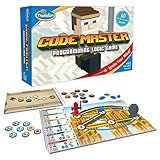
- A single-player programming logic game, model 1950, for ages 8 and up.
- 60 levels across 10 maps, with action and conditional tokens.
- Builds programming logic, sequential reasoning and problem-solving through progressively harder levels.
- Described as suitable for both beginners and expert players.
Why it’s on the list: Not every 12-year-old wants another screen, and Code Master teaches the part of coding that trips people up most: planning a sequence of steps, using conditions, and spotting why a plan fails. The early levels go quickly at this age, but the later ones are a real puzzle, which suits a tween who likes a challenge.
What you’ll need: Nothing beyond the box. It’s played solo, so it works well for quiet time or travel. For more small gift ideas, see our list of STEM gifts under $25.
Ready for Arduino?
Arduino recommends its beginner Plug and Make Kit for ages 14 and up, so it isn’t in the list above. If your child is heading that way, our STEM gifts for 13-year-olds guide includes the official Arduino Starter Kit.
How to choose a coding kit for a 12-year-old
- Start where they are. A tween who has never coded will get further with Codey Rocky or the micro:bit’s blocks. One who already knows Scratch is ready for the micro:bit’s Python or CircuitPython on the Circuit Playground Express.
- Look for a way out of blocks. Every screen-based pick here supports a text language as well as blocks. That matters at this age, because block-only toys tend to get dropped once the novelty wears off.
- Check the device. The micro:bit, Circuit Playground Express and Codey Rocky are coded from a computer. Sphero BOLT+ also works from a phone or tablet. Code Master needs nothing at all.
- Decide between a robot and a board. Robots (Sphero BOLT+, Codey Rocky) are more fun on day one. Boards (micro:bit, Circuit Playground Express) are cheaper and lead further into electronics.
- Treat ages as a guide. A maker’s age marking is a starting point, not a promise that every child will use a product independently.
Frequently asked questions
Should a 12-year-old learn Scratch or Python?
Usually both, in that order. Blocks are a quick way to learn the ideas (loops, conditions, variables), and Python is where most kids go next. The micro:bit, Sphero BOLT+, Circuit Playground Express and Codey Rocky all let a child start in blocks and switch to text in the same tool. Our guide on teaching kids Python has more on making the jump.
Do these coding kits need a computer or tablet?
All but one do. The micro:bit and Circuit Playground Express are programmed from a computer; Sphero BOLT+ works from a phone, tablet, computer or web browser; Codey Rocky is coded through Makeblock’s mBlock 5 software on a computer. ThinkFun Code Master is the only screen-free pick.
Is the micro:bit board included in the micro:bit kit?
Yes. The kit we picked includes the micro:bit V2.2 board, a USB cable, a battery holder and two AAA batteries. Many micro:bit add-on kits on Amazon are sold without the board, so check the listing title for “without micro:bit” before buying extras.
Which pick is the best value?
For a smaller budget, the micro:bit Go kit, the Circuit Playground Express and Code Master were the least expensive picks here when we checked. Prices change often, so use the links to check current pricing.
More STEM gift guides
- Best STEM toys for 12-year-olds
- Best coding and programming toys
- Best robotics kits for middle school students
- How to teach kids Python
Last update on 2026-11-23 / Affiliate links / Images from Amazon Product Advertising API