
4 Best Robotics Kits and Robots for Middle School Students

Middle school is when many students move from dragging code blocks to typing real programs, and when a robot can stop being a toy and become a project. Before choosing, decide which kind of robot you want. A robot kit starts as parts that students assemble, so they learn how the hardware fits together. A ready-built programmable robot works out of the box, so the time goes into coding. This guide has two of each.
We chose these from the makers’ own product, support and app pages, not hands-on testing. Ages, grade bands and requirements are the makers’; the notes on fit are our judgment. Prices and stock change, so check with the seller before you buy. STEMGeek may earn a commission if you buy through some links on this page.
The four picks at a glance
| Pick | Kit or ready-built | Maker’s age or grades | Coding path | Device needed |
|---|---|---|---|---|
| Makeblock mBot2 | Kit | Not quoted (maker’s pages disagree) | Blocks to Python in mBlock | Device that runs mBlock |
| Makeblock mBot | Kit | Not quoted (not clearly stated) | Blocks toward text coding | Device that runs Makeblock’s software |
| Edison V3 robot | Ready-built | 4–16; Python from 13+ | Barcodes, blocks, Scratch-style, Python | Supported computer over USB for all modes; iPad for EdBlocks and EdScratch only, not Python |
| Sphero RVR+ | Ready-built | Grades 6–12 | Drawing, blocks, JavaScript, Python | Phone, tablet or computer |
Our picks
1. Makeblock mBot2

From the maker:
- Makeblock’s newer model in its mBot line.
- Coded in Makeblock’s mBlock software, from block coding to Python.
- Can also be driven from a smartphone or gamepad, or run in automatic modes.
- Built-in rechargeable lithium battery; Makeblock quotes about five hours of play per charge.
Why it’s on the list: Of the two kits here, it has more room to grow. Students assemble the robot, then program it with blocks and move on to Python inside the same software, which lines up well with the jump many middle schoolers make from visual to text coding. The rechargeable battery also suits a robot that will be used often.
Keep in mind: Makeblock’s own pages show different minimum ages for mBot2, so we haven’t quoted one. You’ll need a computer or tablet that runs mBlock; check Makeblock’s supported platforms before buying. Makeblock’s US store says it ships only to the contiguous United States. Make sure the listing says mBot2, because the original mBot below is a different, simpler kit.
2. Makeblock mBot
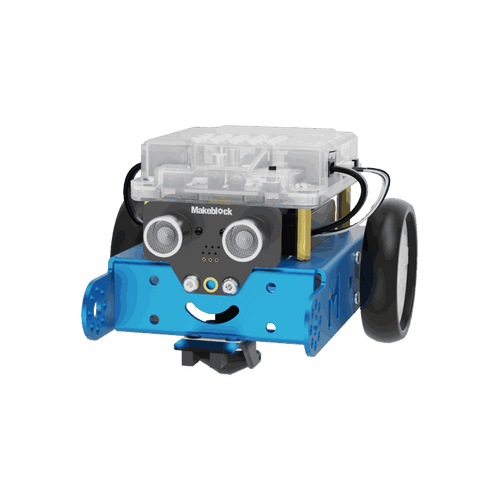
From the maker:
- Makeblock’s entry-level robot kit, assembled by the user.
- Designed as a first step from block coding toward text-based coding.
- Makeblock’s product page points buyers to mBot2 as its newer model.
Why it’s on the list: For a student who has never built a robot, the original mBot is a simpler, lower-commitment way to find out whether they enjoy it. The build is part of the lesson: assembling the robot shows how its parts fit together before any code is written. It suits a sixth grader starting out, or a family that wants to test interest before spending more.
Keep in mind: This is the older model, and it has less headroom than mBot2. A confident coder in seventh or eighth grade may be better served by mBot2’s Python path from the start. Makeblock’s page doesn’t state a clear minimum age, so we haven’t quoted one. Check the listing for battery type and what’s in the box.
3. Edison V3 robot
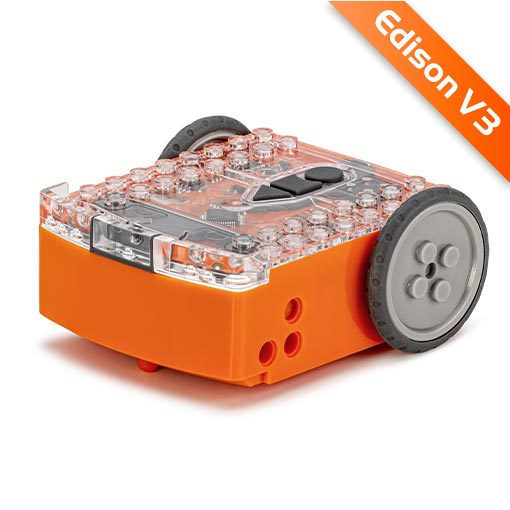
From the maker:
- A ready-built programmable robot with no loose parts, for students aged 4–16.
- Coding options run from scanning barcodes and cards to EdBlocks, EdScratch (suggested from 10+) and EdPy, which uses Python (suggested from 13+).
- Rechargeable internal lithium-ion battery, charged and programmed over a USB-A connection from a supported computer. On an iPad, EdBlocks and EdScratch programs are sent by screen flashing instead, and EdPy isn’t available.
Why it’s on the list: Edison’s coding ladder maps neatly onto middle school: EdScratch for younger students, then EdPy from 13. Because there’s nothing to assemble, students can start programming right away. It’s designed with classrooms in mind, which also makes it a sensible choice for a school robotics club or a family working through structured lessons at home.
Keep in mind: If Python is the goal, don’t plan on an iPad. Edison says iPads can program EdBlocks and EdScratch by screen flashing but can’t use EdPy, and a USB adapter doesn’t change that. For EdPy, use a supported computer with a USB-A port or a suitable adapter. Edison has been sold in several versions, including the Edison 2.0 that older robotics lists named; Edison’s EdPack1 listing is a single Edison V3, SKU EDR001. Edison’s shop may show pricing for your region, so check shipping to your country.
4. Sphero RVR+

From the maker:
- Sphero RVR+, SKU 940-0635, for grades 6–12.
- A programmable driving robot with onboard sensors, a rechargeable removable battery and expansion ports for add-on hardware.
- Coded through the Sphero Edu app or its browser version, using drawing, blocks, JavaScript or Python.
Why it’s on the list: Its grade band starts where middle school does and runs through grade 12, so it offers room to progress beyond introductory blocks. Students can progress from drawing and blocks to JavaScript or Python in the same app, and the expansion ports leave room for more ambitious hardware projects later.
Keep in mind: Sphero sells RVR+ largely to schools, and its product page can default to classroom packs, so select the single-robot option and confirm the price before ordering. RVR+ is the current model; older lists often recommend the original Sphero RVR, so look for the RVR+ name and SKU. Coding needs a phone, tablet or computer, so it isn’t a screen-free robot.
How to choose
- Wants to build the robot: mBot2 for a build that leads into Python; the original mBot for a simpler first build.
- Wants to start coding straight away: Edison V3 for a gradual path through to Python, or Sphero RVR+ for a larger robot aimed at grades 6–12.
- Check the device. Every pick needs a phone, tablet or computer for coding. Confirm your device is supported. For Edison’s Python path, that means a computer that can connect over USB-A; an iPad handles only EdBlocks and EdScratch.
- Treat ages as a guide. A maker’s age or grade band is a starting point, not a promise that every student will manage without help.
You may see LEGO Mindstorms Robot Inventor (51515) and LEGO BOOST (17101) on older robotics lists. LEGO lists both as retired, and says the Robot Inventor app is no longer available, although the hub can still be programmed through LEGO’s SPIKE app. We haven’t included them for new buyers.
More STEM gift guides
- Best STEM toys for 12-year-olds
- Best coding toys for kids, for younger siblings
- Best STEM toys for teens
Last update on 2026-10-20 / Affiliate links / Images from Amazon Product Advertising API