


5 Best Engineering Kits for Adults: Robotics, Electronics & Mechanical Builds

An engineering kit is a satisfying excuse to take something apart, work out how it moves, and build it again. For adults, the best choice depends less on the age printed on the box than on what you want to learn: mechanical assembly, circuits, robot control or coding.
Our all-round starting point is the ELEGOO Smart Robot Car Kit V4.0 with Camera. Building a vehicle gives the electronics and programming a clear purpose. But engineering goes well beyond robots: the LEGO Technic McLaren P1 is our pick for someone who would rather explore a gearbox than install software, while the Mega 2560 kit suits a desk full of circuits.
STEMGeek may earn a commission if you buy through some links on this page.
Which engineering kit fits your interests?
| Kit | Our pick for | Device or setup to plan for |
|---|---|---|
| ELEGOO Smart Robot Car V4.0 with Camera | An introduction to building and coding a robot | Computer for Arduino programming; compatible phone/tablet for mobile control |
| Makeblock mBot Ultimate | Rebuilding different robot designs | Computer; added Raspberry Pi and setup for Python |
| Hiwonder xArm 1S | Assembling and teaching a robot arm | Choose unassembled option; check PC/app compatibility |
| ELEGOO Mega 2560 The Most Complete Starter Kit | Learning electronics through smaller projects | External computer for Arduino IDE |
| LEGO Technic McLaren P1 (42172) | A substantial mechanical model | Building and display space; no coding device needed |
Our five engineering kit picks
1. ELEGOO Smart Robot Car Kit V4.0 with Camera — best all-round introduction

We like a robot car as a first engineering project because it has an obvious goal: assemble it, make it move, then change what it does. This exact ELEGOO kit is the V4.0 with Camera, an Arduino-based vehicle with phone or tablet control. It brings mechanical assembly and electronics together in a finished object you can experiment with.
Arduino can sound intimidating at first. Here, think of it as a programmable controller: your computer is where you write and upload code, and the car’s board runs it. That makes this a useful stepping stone toward your own electronics projects, rather than just a remote-controlled toy.
The tradeoff: choose this if you want a vehicle-shaped starting point; choose the Mega kit below if loose components appeal more. Have a computer available for programming and check mobile-device compatibility for the control app. Match the V4.0-with-camera name when ordering, since ELEGOO sells different car versions.
See ELEGOO’s specifications · Check on Amazon
2. Makeblock mBot Ultimate — best for rebuilding and coding

If finishing one robot would leave you asking “what next?”, mBot Ultimate is the more appealing starting point. Makeblock describes ten robot configurations, with block-based mBlock programming and the Arduino IDE. Its support documentation also uses the name Ultimate 2.0.
For an adult, the attraction is the chance to connect mechanical choices with code: rebuilding the machine changes the problem you are trying to solve. We would choose it over the ELEGOO car when experimenting with different forms matters more than getting one vehicle assembled. Makeblock’s 12+ rating reflects its educational audience; adults can use the same hardware and programming tools beyond the introductory lessons.
The tradeoff: it asks for more commitment to assembly and software setup. Plan to use a computer, and don’t buy it expecting Python straight out of the box: that path requires a Raspberry Pi plus firmware and setup changes. The robot uses six AA batteries or a compatible rechargeable lithium battery pack. Check your selected bundle for the power supply, since included battery offers vary. Makeblock’s U.S. store serves the contiguous states.
See Makeblock · Check on Amazon
3. Hiwonder xArm 1S — best for robot-arm control
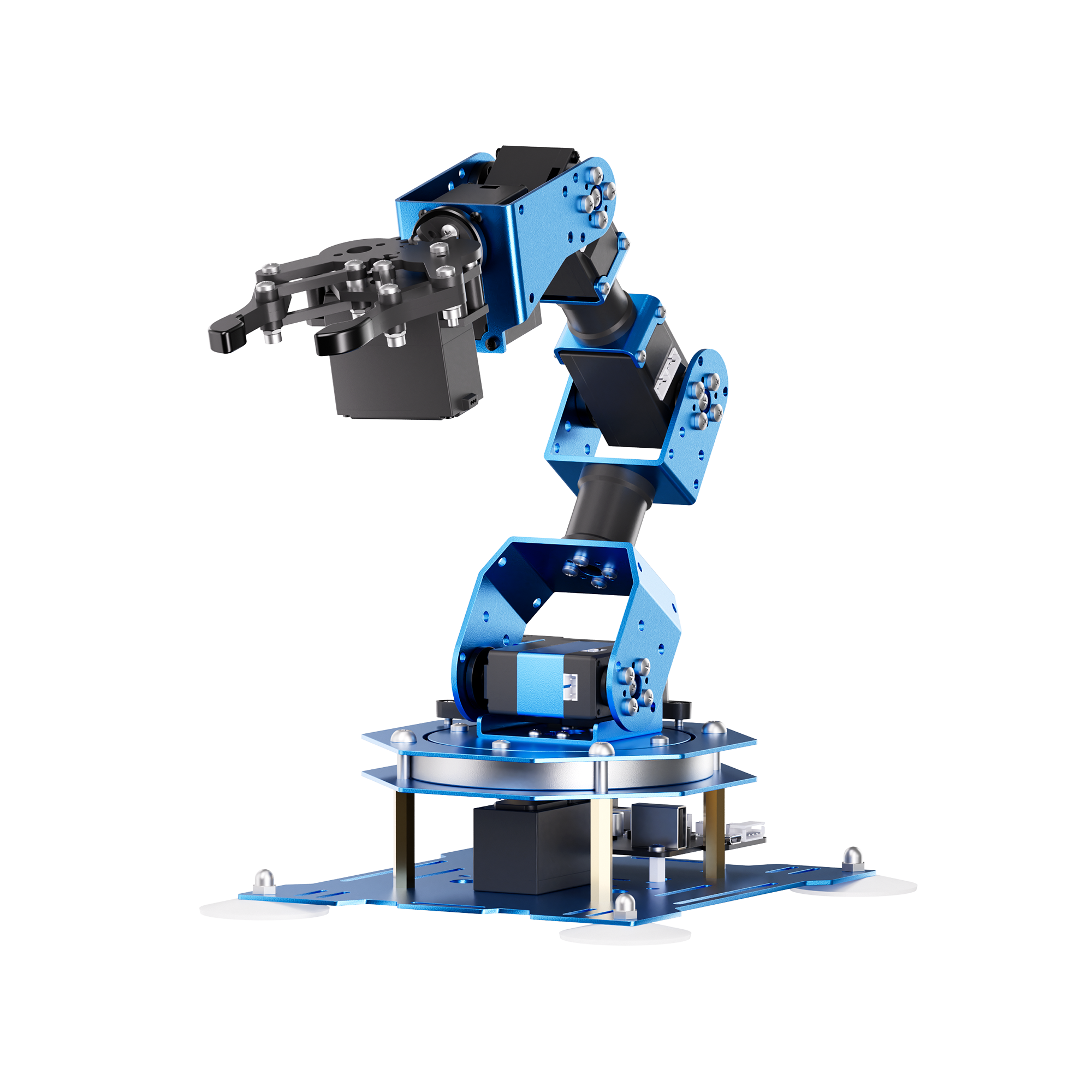
A robot arm puts movement itself at the center of the project. The Hiwonder xArm 1S, SKU 21010002, offers six degrees of freedom, counted as five axes plus the gripper. Hiwonder sells assembled and unassembled options; select the latter if building the mechanism is part of the appeal.
We would choose it for an adult curious about positioning, gripping and teaching a sequence of movements. The maker lists a PS2-style controller and receiver, USB connection, PC software and a mobile app, along with a 7.5V/6A power supply. Check the software requirements against your devices before buying.
The tradeoff: teaching an arm movements is different from writing programs in a general-purpose language. Hiwonder’s FAQ says this model has no IDE and does not support code compilation, so it isn’t our choice for a first Python course. It earns its place for physical control and assembly. Allow for shipping and any applicable import charges when comparing the delivered cost.
4. ELEGOO Mega 2560 The Most Complete Starter Kit — best for electronics

No single box can cover every branch of electronics, but this Mega 2560 kit gives a curious adult plenty of starting points. ELEGOO lists more than 200 components and over 35 lessons, built around an Arduino-compatible controller. It is the pick for someone who wants to build circuits and see what individual components do, without committing to a single robot design.
Our advice is to follow the lessons in sequence before combining parts into your own projects. A large assortment is useful breadth, but opening every packet at once can turn a first session into a sorting exercise. A clear work surface and somewhere to store the pieces will make repeated sessions easier.
The tradeoff: you supply the computer used for the Arduino IDE. This is a controller and electronics kit, not a standalone PC. ELEGOO rates it 12+, but adult beginners should choose it for the subject matter and expect to spend time understanding both wiring and code.
5. LEGO Technic McLaren P1 (42172) — best for mechanical assembly

There is plenty of engineering to enjoy without writing a line of code. LEGO’s Technic McLaren P1, set 42172, is a 3,893-piece, 1:8-scale model with a V8 piston engine, seven-speed gearbox and suspension. LEGO labels it 18+, making this the most explicitly adult-focused build in our selection.
We would pick it for the builder who enjoys seeing how mechanisms fit together and wants a finished model worth keeping on display. Following the assembly gives you a close look at linked mechanical systems, although we would treat that as an invitation to explore rather than a substitute for an engineering course.
The tradeoff: this is a substantial premium model, and the finished car needs a home. It is not motorized or a drivable RC car, and there is no programming element. Choose it for the build and mechanisms; choose one of the robotics kits if you want software to change what your creation does.
How to choose an engineering kit as an adult
Decide what a successful evening looks like. If it means assembling a mechanism, start with LEGO or the unassembled xArm. If it means changing behavior with code, start with the car or mBot Ultimate. If you want to understand circuits one experiment at a time, the Mega kit is the more direct match.
Budget for the complete setup. A computer, compatible control device, optional Raspberry Pi, workspace and storage can matter as much as the box itself. Check software support before buying a gift: a tablet isn’t automatically a substitute for a computer running a programming environment.
For more software-focused choices, see our coding toys and kits for adults. If the goal is assembling a working computer, our build-your-own computer guide separates complete computers from electronics add-ons.
How we chose these kits
We compared manufacturer specifications, instructions and product support for the named models, looking for a worthwhile build, a clear learning purpose and realistic device requirements. The recommendations are editorial judgments based on those sources; this update adds no new hands-on testing. Manufacturer age labels describe their intended audience. Prices, delivery costs and availability can change, so confirm the exact version and total cost with the seller.
Last update on 2026-10-24 / Affiliate links / Images from Amazon Product Advertising API